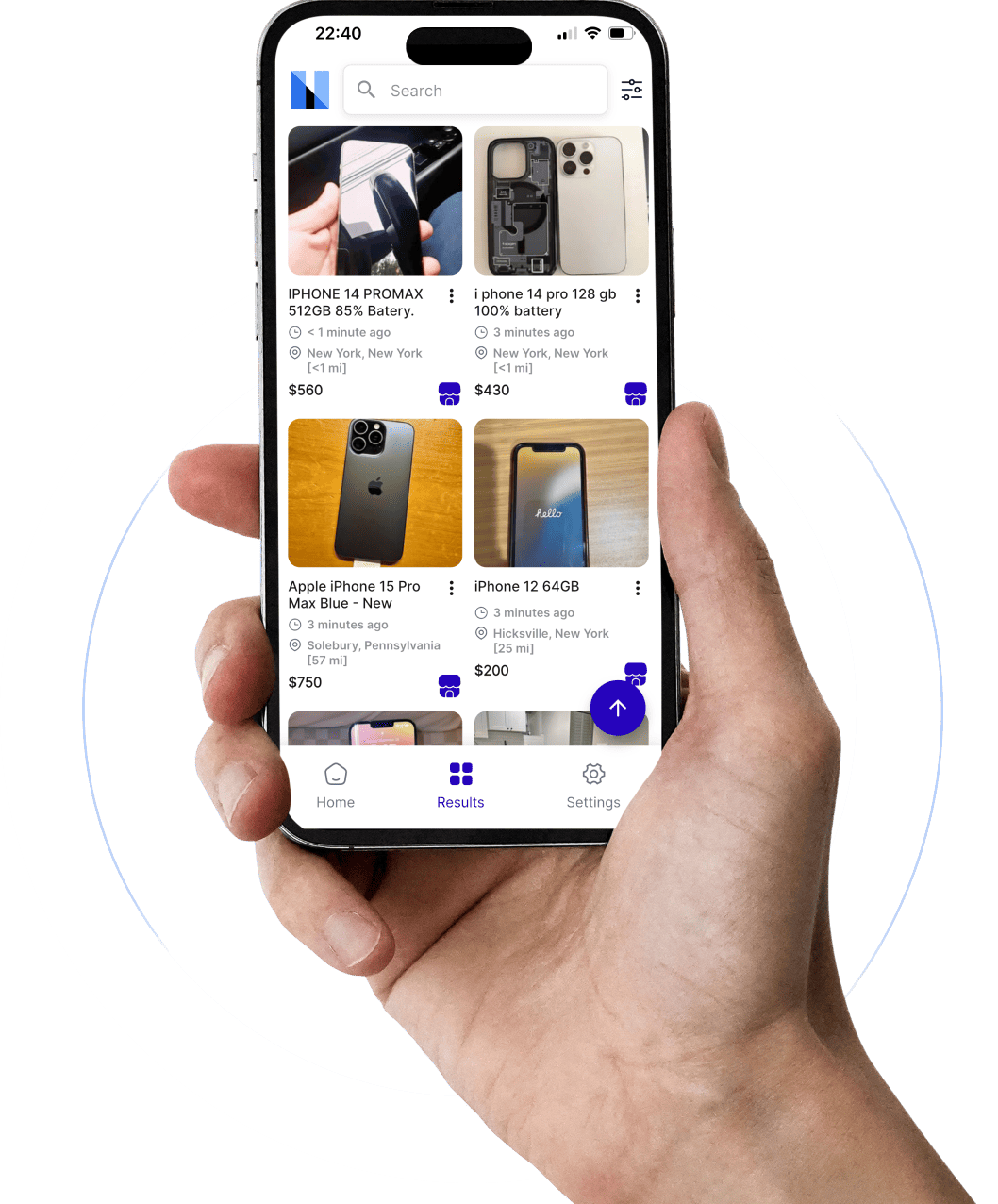
The honest, slightly painful truth about what happens between "Save Search" and your phone actually buzzing.
📑 What's In This Guide
- How Facebook Marketplace Alerts Actually Work
- Turning On Marketplace Notifications
- Setting Up Alerts on Mobile
- Saved Searches and Notification Triggers
- Using Keyword Strategies to Reduce Junk Listings
- Delayed or Missing Alerts
- Limitations of Native Alerts
- How Marketplace Monitor Fills the Gaps
- Power Tips for Flippers and Serious Buyers
- FAQs
I lost a Herman Miller chair for ₹1,500 last month. Not because I wasn't looking. I was looking. But I was looking the wrong way — manually refreshing Marketplace like it was 2019 — while somebody with a proper alert setup messaged the seller four minutes before I even saw the listing.
Four minutes. That's the difference between "great find" and "Pending Pickup."
If you've ever wondered why some buyers seem impossibly fast on Marketplace, it usually comes down to one thing: they understand how Facebook Marketplace alerts actually work. Not the vague "save a search and wait" version. The real mechanics — the polling intervals, the notification delays, the device-level settings that quietly sabotage everything, and the workarounds that experienced flippers use to stay ahead.
By the end of this guide, you'll know exactly how the system works, why it fails, and how to build something better. Maybe you'll even smile once or twice while reading it. No promises.
Stop losing deals to people who got there first. Marketplace Monitor sends real-time alerts the moment a matching listing goes live — before Facebook even thinks about notifying you.
Start Your Free Trial →How Facebook Marketplace Alerts Actually Work
Most people imagine Facebook Marketplace alerts working like stock-market notifications — instant, precise, no-nonsense. The reality is messier. Quite a bit messier, actually.
Here's what happens behind the curtain.
Facebook Marketplace relies on a combination of saved searches, notification preferences, and platform-level activity signals. When you search for something — say, a PS5 under $250 within 30 miles — and save that search, Facebook begins comparing new listings against your criteria. When something matches, it attempts to send a push notification or in-app alert.
Key word: attempts.
Sometimes the notification lands instantly. Sometimes it strolls in fifteen minutes later like it stopped for coffee. Occasionally, the listing shows up on Marketplace before the notification even fires — meaning someone browsing manually might see it before you do, despite your alert supposedly giving you an edge.
Think of it like an airport luggage belt. Your saved search puts a tag on the type of listing you want. When a match enters the system, Facebook tries to route it to you. But the belt doesn't always spin at the same speed. Sometimes there's lag. Sometimes your bag ends up on the wrong carousel entirely.
Facebook documents these saved search and notification controls through its Marketplace notification settings help page, though the exact timing and frequency of alerts remains deliberately vague.
That inconsistency is exactly why experienced Marketplace buyers rarely depend on alerts alone. They combine saved searches, manual checks, smart filters, timing strategies, and sometimes dedicated marketplace monitoring tools to build redundancy into their sourcing. The goal is simple: see listings before everybody else does.
Turning On Marketplace Notifications
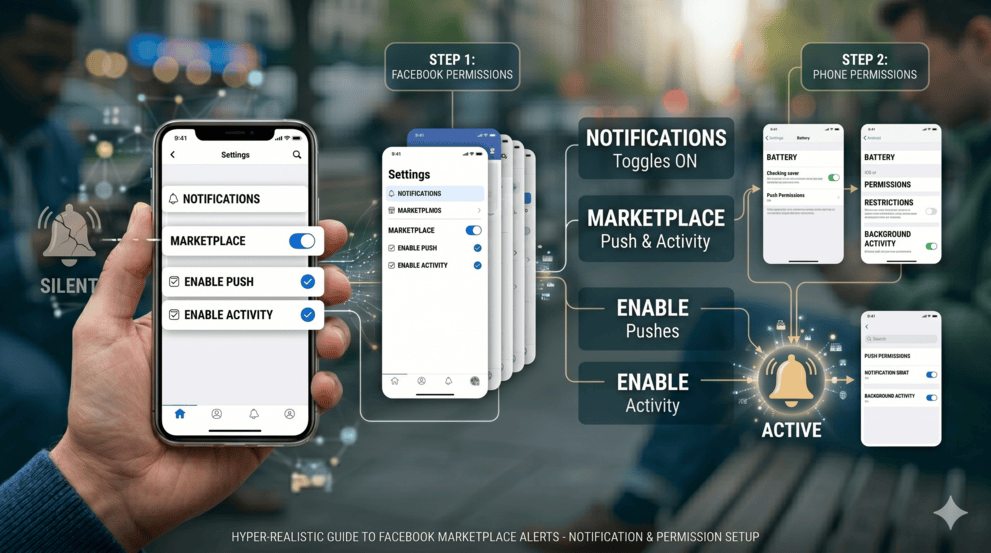
This is the step people skip. Not because it's hard — it takes thirty seconds. But because most people assume saving a search automatically means they'll get notified. It doesn't. Not unless your notification settings are properly configured on both Facebook's side and your phone's side.
Two different systems. Both need to cooperate. And they don't always talk to each other nicely.
Inside Facebook:
Make sure these are on:
- ✅ Saved search notifications
- ✅ Listing updates
- ✅ Marketplace messages
- ✅ Push notifications
Facebook explains Marketplace notification controls through its official support documentation. Worth a two-minute read if you've never checked these settings.
On Your Phone:
This is where things get sneaky. Your phone itself can silently block Marketplace alerts without you knowing.
On iPhone: Check Settings → Notifications → Facebook. Enable banners, sounds, lock screen. Disable Scheduled Summary for Facebook. Make sure Focus modes aren't filtering Facebook notifications.
On Android: Check Settings → Apps → Facebook → Notifications. Also go to Settings → Apps → Facebook → Battery → set to Unrestricted. Samsung, Xiaomi, Oppo, and Huawei devices are particularly aggressive about throttling background apps.
A study of iOS notification delivery by Apple confirms that Focus modes and notification summaries can delay or suppress app notifications entirely — and most users don't even realise they've enabled something that's slowing them down.
Setting Up Facebook Marketplace Alerts on Mobile
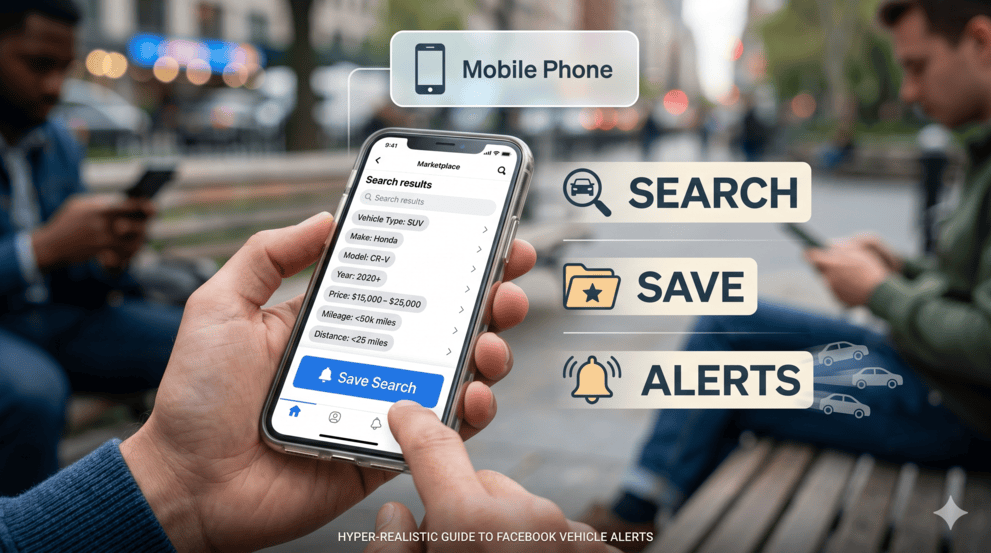
Most Marketplace activity happens on mobile. Makes sense — your phone travels with you, deals don't wait for you to get home and open a laptop, and the one time you leave your phone in the other room is the exact moment a ₹2,000 standing desk gets posted.
The setup takes about three minutes. Here's how to do it right.
Step 1: Open Marketplace in the Facebook app. Search for what you want — but be specific. "Laptop" is not a search. "MacBook Air M2 2023" is a search. The quality of your alert is directly proportional to the quality of your search.
Step 2: Apply filters. Location radius, price range, condition, category. Every filter you skip is noise you're choosing to receive. Don't complain about irrelevant alerts if you didn't filter properly — that's like ordering a mystery box and being surprised it's not what you wanted.
Step 3: Tap "Save Search" or "Notify Me." This creates the alert trigger. Facebook now watches for matching listings.
Step 4: Verify notifications are enabled (see previous section). This is the step 70% of people forget. Your alert exists. Whether you actually hear it is a different question.
Desktop setup follows the same logic — search, filter, save — but mobile alerts are significantly faster and more reliable. If you're serious about competing, mobile is your primary tool. Desktop is for research.
Saved Searches and Notification Triggers
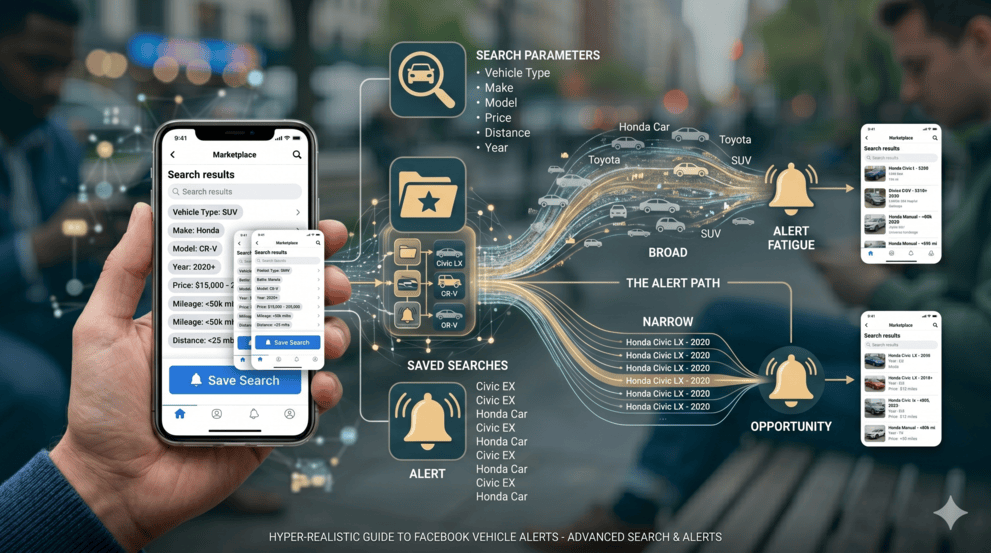
Saved searches are the backbone of Facebook Marketplace alerts. Everything else — the notifications, the buzzes, the alerts — depends on this one feature working correctly.
When you save a search, Facebook stores your parameters: keywords, price range, distance, category, condition. The platform then compares newly posted listings against those filters. When something matches, a notification fires.
In theory.
Here's the part most people miss: broader searches create noisier alerts. Narrower searches create better results. This is the single biggest factor determining whether your alert system is useful or maddening.
Searching for "Toyota" will generate wildly different (and mostly useless) results compared to "Toyota Camry 2019 under $15,000 within 40 miles." The second version gives Facebook something specific to match against. The first version is basically asking Facebook to show you every Toyota-adjacent thing within driving distance — which includes floor mats, Matchbox cars, and that one person who listed their cat sitting on a Toyota.
Smart buyers also create multiple overlapping saved searches for the same product:
- "Honda Civic EX"
- "Civic"
- "Honda car"
- "Civic clean title"
- "Honda sedan"
Why? Because sellers are spectacularly inconsistent. One person writes a detailed description. The next uploads a blurry photo and types "good car need gone." If you're only tracking exact keywords, those badly-titled listings — which often have the best prices — slip right past you.
This multi-keyword strategy is the same approach used in Marketplace bot setups and scraping tools — it's fundamental to effective marketplace monitoring at any level.
Using Keyword Strategies to Reduce Junk Listings
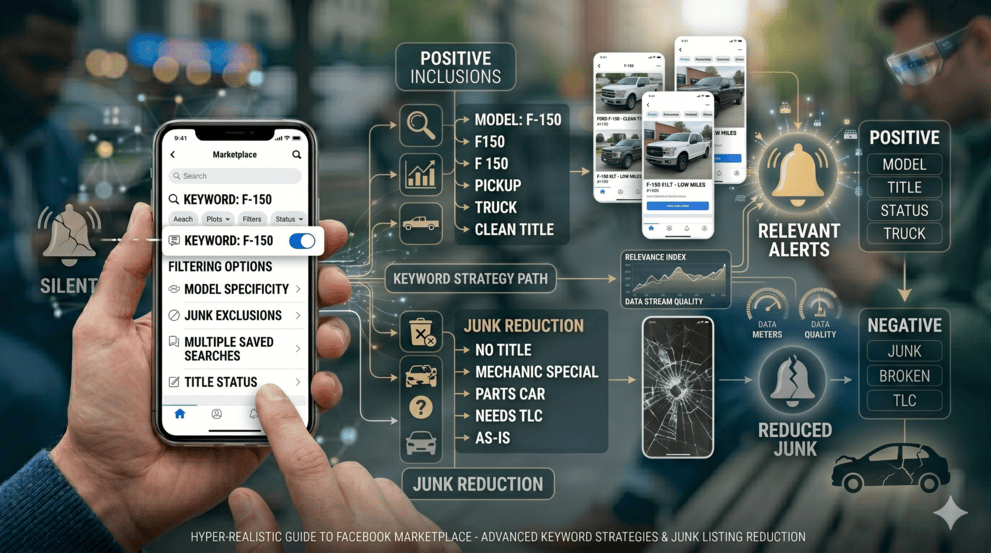
This part feels almost unfair once you learn it. Because most people never think about the words they use in their saved searches — and those words are basically the entire operating system behind your alert quality.
Marketplace search matching is imperfect. Facebook doesn't understand context the way a human does. It matches text. So the text you give it determines what you get back.
Suppose you want a Ford F-150. Instead of one saved search, create several:
| What You Want | Keyword Variations to Save |
|---|---|
| Ford F-150 | Ford F150, Ford F-150, F150, pickup truck, Ford truck, F150 clean title |
| iPhone 15 | iPhone 15 Pro, Apple phone, unlocked iPhone, i phone 15, iPhone fifteen |
| Sofa / couch | sofa, couch, sectional, L-shaped sofa, lounge, settee |
| Gaming console | PS5, PlayStation 5, Play Station, Sony console, playstation5 |
Multiple saved search notifications widen your reach without sacrificing relevance. And here's a bonus trick — some of the best deals hide behind terrible titles. "Old Apple laptop" might be a MacBook Pro worth ₹40,000. "Sony game thing" might be a PS5. Those vague, lazy listings often have the best prices because fewer people find them.
This same keyword-layering principle is exactly what powers tools like Marketplace Monitor's multi-keyword tracking — the automated version of what you're doing manually. Whether you do it by hand or let software handle it, the logic is identical: more variations = more coverage = more deals caught.
Good alerts aren't about volume. They're about signal quality. And signal quality starts with search language.
Delayed or Missing Saved Search Alerts
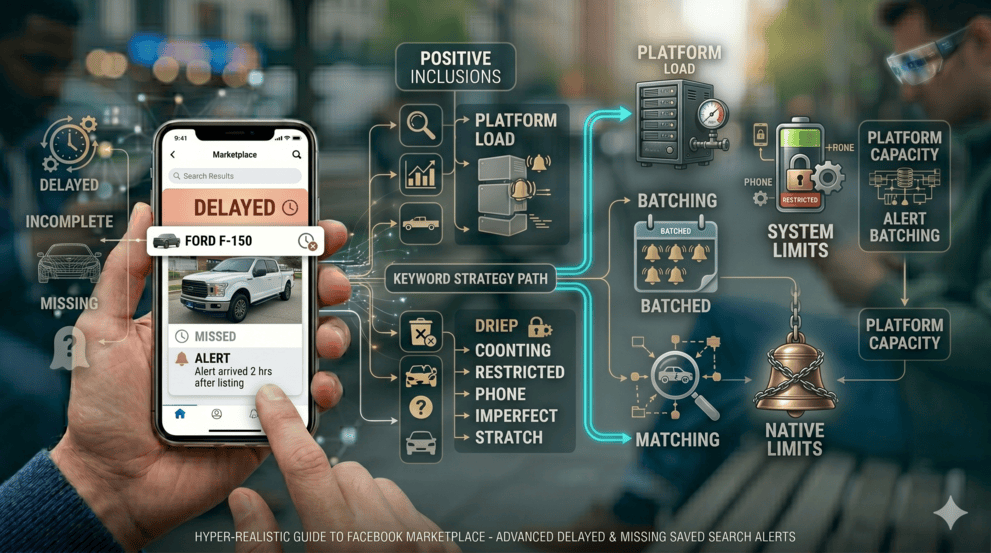
Now we reach the part that makes everyone's blood pressure spike a little.
You saved the search. Enabled notifications. Configured filters. Everything looks perfect. And then… a listing you would have killed for shows up with twenty messages already. Your phone never buzzed. Or it buzzed twenty minutes late — which, in Marketplace terms, might as well be next Tuesday.
This happens more than Facebook would like to admit. Users consistently report delayed notifications, incomplete matches, alerts arriving after listings appear in manual searches, and alerts that simply never show up at all.
Why? Several things are happening simultaneously:
| Cause | What It Does to Your Alerts |
|---|---|
| Facebook server load | Notifications get batched during peak hours instead of sent instantly |
| Notification batching | Multiple alerts grouped together and delivered as a batch — late |
| Background restrictions | Your phone kills Facebook's background process to save battery |
| Search relevance matching | Facebook's algorithm decides a listing "partially" matches and deprioritises the alert |
| Multi-device conflicts | Alerts distributed inconsistently across phone, tablet, desktop |
| App cache corruption | Random glitches from corrupted app data — more common than you'd think |
The exact internal mechanics aren't publicly documented. And honestly, they don't need to be. The practical takeaway matters more: Facebook Marketplace alerts are helpful but they are not a guaranteed real-time system. They're closer to "best effort" delivery — which is fine for casual browsing, but genuinely painful if you're competing for underpriced inventory.
Facebook's own support guidance recommends reviewing notification preferences and app permissions when alerts behave unexpectedly. Reinstalling the app also fixes a surprising number of issues — corrupted settings are more common than most people realise.
The Honest Limitations of Facebook's Native Alert System
Let's give credit where it's due — Facebook's saved search and notification system works. For casual browsing, it's perfectly adequate. You save a search, you eventually get notified when something matches, and if you're not in a competitive category, that's probably fine.
But "eventually" and "probably fine" aren't great words when you're trying to source underpriced inventory before other buyers.
Here's where the native system genuinely falls short:
- No true real-time delivery. Notifications can lag by minutes, sometimes much longer. In competitive categories, minutes are everything.
- No cross-platform monitoring. Facebook alerts only cover Facebook. Deals also appear on Craigslist, eBay, OfferUp, Kijiji, and Gumtree simultaneously.
- No scam or spam filtering. Your alerts will happily show you fake listings, duplicate reposts, and reseller junk alongside real deals.
- Basic keyword matching only. No exclusion filters, no AI-powered relevance scoring, no way to automatically deprioritise listings that match keywords but aren't actually what you want.
- No multi-city monitoring. You can save searches for your local area, but monitoring multiple cities simultaneously requires separate manual searches for each location.
- Inconsistent device behaviour. Alerts arrive differently on different devices — sometimes phone first, sometimes desktop first, sometimes nowhere at all.
None of this makes native alerts useless. They're a solid starting point. But for anyone sourcing inventory seriously — flipping phones, sourcing cars, flipping furniture — relying exclusively on Facebook's native system means accepting that you'll lose some deals you shouldn't have lost.
And that's a solvable problem.
Stop losing deals to people who got there first. Marketplace Monitor sends real-time alerts the moment a matching listing goes live — before Facebook even thinks about notifying you.
Start Your Free Trial →How Marketplace Monitor Fills the Gaps
Every limitation described above? Those are the exact problems Marketplace Monitor was built to solve. Not as a replacement for Facebook's system — as a layer on top of it that fixes the holes.
Here's how it works, practically:
Continuous scanning, not batch notifications. While Facebook processes alerts through its massive, congested notification infrastructure, Marketplace Monitor scans listings independently and pushes alerts the moment matches appear. Users consistently report receiving notifications before Facebook's own system delivers them.
Multi-platform monitoring. One dashboard tracks listings across Facebook Marketplace, eBay, Craigslist, OfferUp, and more. A gaming console sitting unsold on OfferUp might be selling instantly on Facebook — and vice versa. Multi-platform coverage catches what single-platform alerts miss.
Built-in scam and spam filtering. The system automatically removes duplicate listings, fake posts, and reseller noise — so your alerts contain actual opportunities, not garbage you have to wade through.
Multi-keyword tracking. Instead of creating fifteen separate saved searches manually, you can set up keyword variations once and let the system handle the matching. It tracks all the "Sony game thing" and "i phone fifteen" variations automatically.
Multi-city and nationwide scanning. Monitor listings across regions simultaneously without switching between separate searches. Geographic arbitrage — buying cheap in one area and selling where demand is higher — becomes genuinely practical.
Is it necessary for every buyer? No. If you're casually browsing for a coffee table, Facebook's native alerts will probably get the job done. But if you're sourcing inventory, flipping couches, chasing underpriced electronics, or running any kind of resale operation where speed and coverage matter — the difference is significant.
Power Tips for Flippers and Serious Buyers
Everything above is the foundation. This section is where it gets tactical. These are habits and strategies used by people who actually make money on Marketplace — not just people who write articles about it.
1. Build a Multi-Layered Alert System
Don't pick one method. Stack them. Facebook saved searches + phone notification optimisation + a monitoring tool like Marketplace Monitor. Redundancy isn't overkill here — it's insurance.
2. Create 10–20 Saved Searches, Not Two
Cover every keyword variation, every misspelling, every lazy title a seller might use. The person who saves one search catches one slice of the market. The person who saves twenty catches significantly more.
3. Pre-Write Your Opening Message
Keep it in your Notes app. Something like: "Hi, is this still available? I can pick up today. Cash ready." The first message usually wins. Not the longest. Not the most polite. The first.
4. Monitor Multiple Platforms Simultaneously
The same item priced at full value on Facebook might be listed cheap on Craigslist or OfferUp. Cross-platform monitoring catches these pricing gaps.
5. Know the Market Price Before the Alert Arrives
This separates fast-and-smart from fast-and-reckless. If you already know what a PS5 sells for on eBay, you can assess a Marketplace listing in five seconds flat. Hesitation is where deals die.
6. Target Badly-Titled Listings Specifically
"Old Apple laptop." "Sony game thing." "Camera." These vague titles scare off keyword-dependent searchers but often hide incredible deals from sellers who don't know the market value of what they're selling.
7. Separate Urgency from Panic
Speed matters. Recklessness doesn't. Always verify the listing, check for scam red flags, and trust your instincts. There will always be another deal. The FTC's consumer protection resources are worth bookmarking for anyone transacting regularly on peer-to-peer marketplaces.
Stop losing deals to people who got there first. Marketplace Monitor sends real-time alerts the moment a matching listing goes live — before Facebook even thinks about notifying you.
Start Your Free Trial →